Send any EPUB to your Kindle
Drop in an .epub, type your Kindle address, and it arrives on the device in about a minute. Free: you make an account when you hit send, and the file is deleted the moment it’s on its way.
Need a book? Where to get free EPUBs
- eReaderIQ Freebies
Tracks free Kindle books on Amazon, updated daily. Good for current bestsellers and new releases when they go free.
- Standard Ebooks
Volunteer-run project that takes public domain books and reformats them with professional typography, proper typesetting and custom cover art.
- Project Gutenberg
The original. Over 70,000 free ebooks, mostly classics whose US copyright has expired.
- ManyBooks
More than 50,000 free titles across a lot of genres, with a clean interface and EPUB, Kindle and PDF downloads. A good mix of classics and indie writing.
How to send an EPUB to your Kindle
- 1
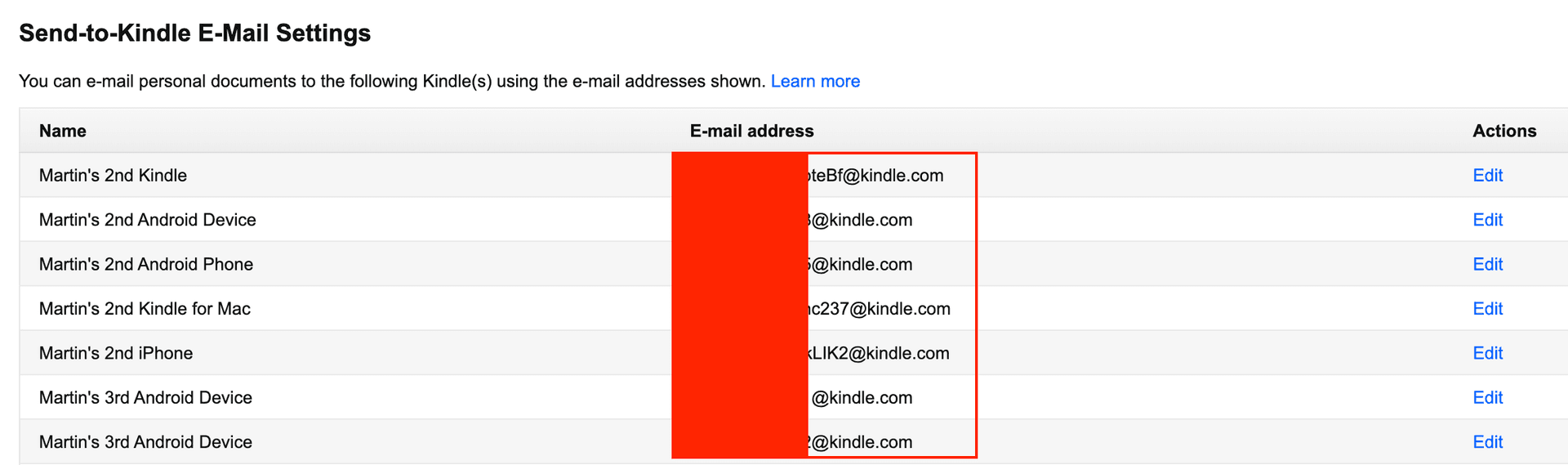
Find your Send-to-Kindle email address
On the device: Settings → Your Account → Send-to-Kindle Email. On the web: Manage your content and devices, then Preferences → Personal Document Settings. It ends in @kindle.com and it is not your Amazon login.
- 2
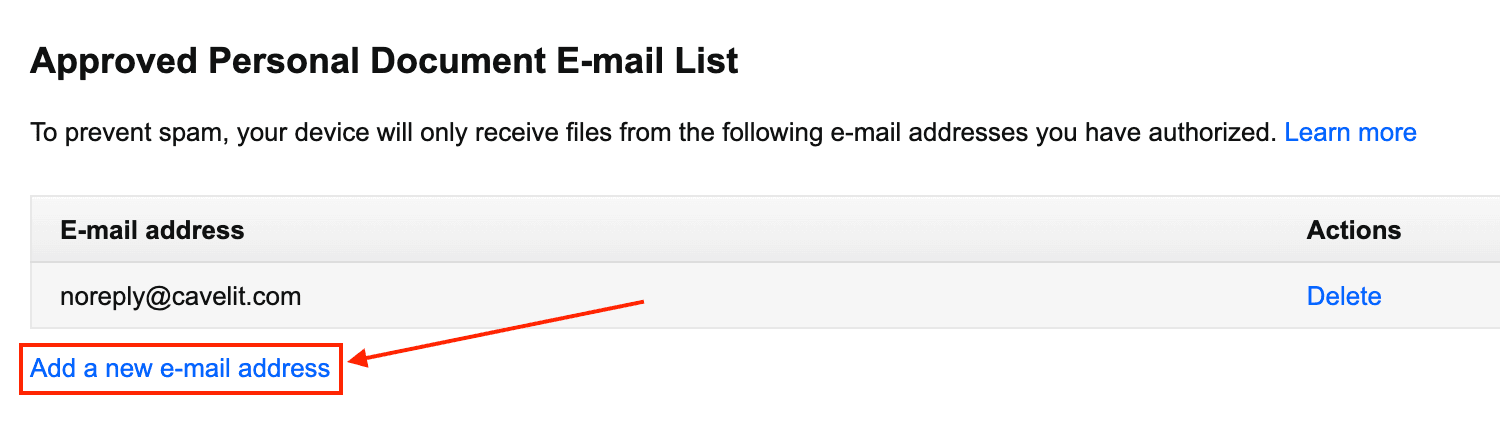
Approve newpost@rsstokindle.com as a sender
Amazon silently drops documents from addresses you haven’t approved, which is the reason almost every failed delivery fails. On the same Preferences page, open Approved Personal Document E-mail List and add newpost@rsstokindle.com. Amazon’s help page covers it too.
- 3
Drop the .epub into the box at the top of this page
Up to 25 MB. We check it’s a real EPUB before anything leaves, and delete it once the email is out. You’ll create a free account at the send step, the same one that delivers blogs and Substacks to your Kindle. Back to the tool. Nothing to send yet? Here are four places to get free EPUBs.
- 4
Open Library on your Kindle
Delivery usually takes under a minute; the device has to be on wifi. Amazon converts the EPUB on arrival, so it behaves like any other book, with fonts, notes, and sync across devices. Nothing showed up? Jump to the troubleshooting answers.
Common questions
Can a Kindle read EPUB?
Yes. Since 2022 Amazon accepts EPUB by email and converts it to its own format on arrival. What it no longer accepts is MOBI, the format everyone still has lying around.
Do I need to convert the EPUB first?
No. Don't run it through a converter — upload the .epub as it is and Amazon converts it on arrival, which gives a better result than most desktop converters do. Converting to MOBI first is the one thing that will stop it working, since Amazon no longer accepts MOBI.
Where is my Kindle email address?
Settings → Your Account → Send-to-Kindle Email on the device, or Manage Your Content and Devices → Preferences on Amazon. It looks like yourname_a1b2@kindle.com, and it is not your Amazon login.
Why didn't my file arrive?
Nine times in ten, the sending address isn't on your approved list. Add newpost@rsstokindle.com in Personal Document Settings and send it again.
Does this cost anything?
No. Sending is free. You create a free account at the send step. That account is what keeps the tool from being used to mail files to strangers, and it's the same account that delivers blogs and Substacks to your Kindle.
Do you keep my file?
No. It exists only long enough to attach to the email, then it's deleted. There is no public link to it at any point.
What size files can I send?
Up to 25 MB, which covers essentially every book. Amazon's own ceiling is around 50 MB.
Can I send several books at once?
One at a time here. If you're moving a whole library, send them in batches a few minutes apart so Amazon doesn't throttle the delivery.
Will it work on a Kobo or Boox?
Those read EPUB directly, so copy the file over by USB or their own cloud. This tool exists because Kindle is the one that needs the email hop.
Anything else, write to marty@rsstokindle.com.
Your blogs and Substacks, on the same Kindle
Follow any blog, Substack or news site. Every new article is pulled in full, typeset properly, and delivered to the address you just used, without you doing anything.
Browse blogs and Substacks