Can you read The New York Times on a Kindle? 3 ways that work (2026)
Yes, but not the old way: the Kindle edition ended in 2023. The three ways that still work, with screenshots: daily headlines, and two ways to send full articles if you subscribe.
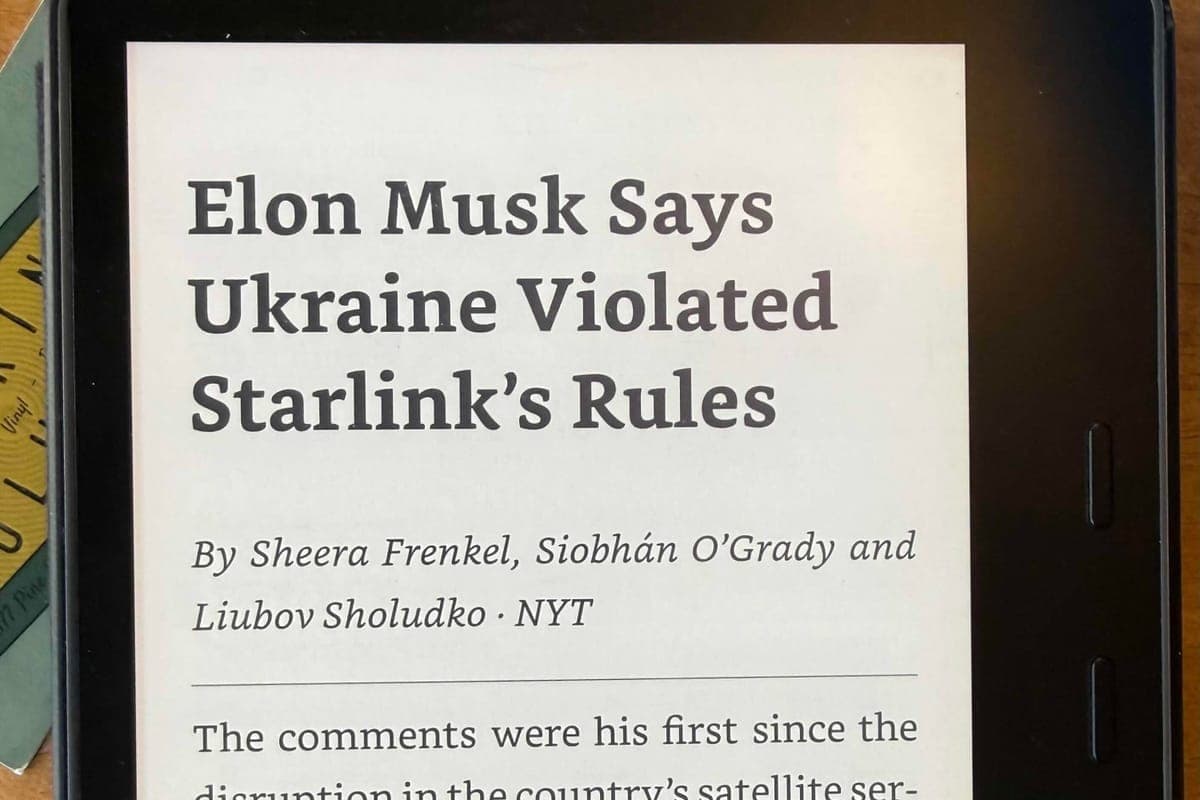
Short answer: yes. RSS to Kindle sends the Times’ headlines to your Kindle every morning as one ebook, each story with its byline and first few lines. Open the NYT feed, add your Kindle’s email address, and tomorrow’s news is waiting when you wake up.
Send the NYT to my KindleI used to wake up to The New York Times on my Kindle. Then Amazon stopped selling the Kindle edition on 9 March 2023, and the Times’ own help page now says its subscriptions don’t include a Kindle edition. I’ve tried every workaround since. Three are worth your time, and each has a trade-off:
- Daily headlines with RSS to Kindle: arrives on its own every morning and needs no Times subscription. But you get headlines and the first lines, not full articles.
- The Send to Kindle browser extension: the whole article. But you need a Times subscription and a computer, and you send each article yourself.
- Sharing from an iPhone or iPad: the whole article, from your phone. But you need a Times subscription, it only works from Safari, and you send each article yourself.
1. Get the NYT headlines on your Kindle every morning
This is the closest thing to what I lost, and truthfully a reason why I built the RSS to Kindle tool. It reads the Times’ feed each morning and emails what it finds to my Kindle as one ebook.
The catch is that the New York Times doesn’t let other apps read past its paywall, so you get the headline and the first couple of sentences, like the photo at the top.
Other news sites don’t lock their pages, and their stories arrive in full: The Atlantic, BBC News and NPR all come through whole. So if you want the news on your Kindle every day, bundle the Times headlines with these sites into one morning ebook. Pick the topics you read and we’ll set up a starter paper for you. When a Times story is worth reading in full, I use option 2 or 3.
- What you get: the day’s Times headlines, each with a sentence or two, every morning. The free plan sends two articles a day; the paid plan, at $60/year, sends every new story.
- What you need: your Kindle’s email address. No Times subscription.
- How: subscribe to the NYT feed on RSS to Kindle and add your Kindle’s email address.
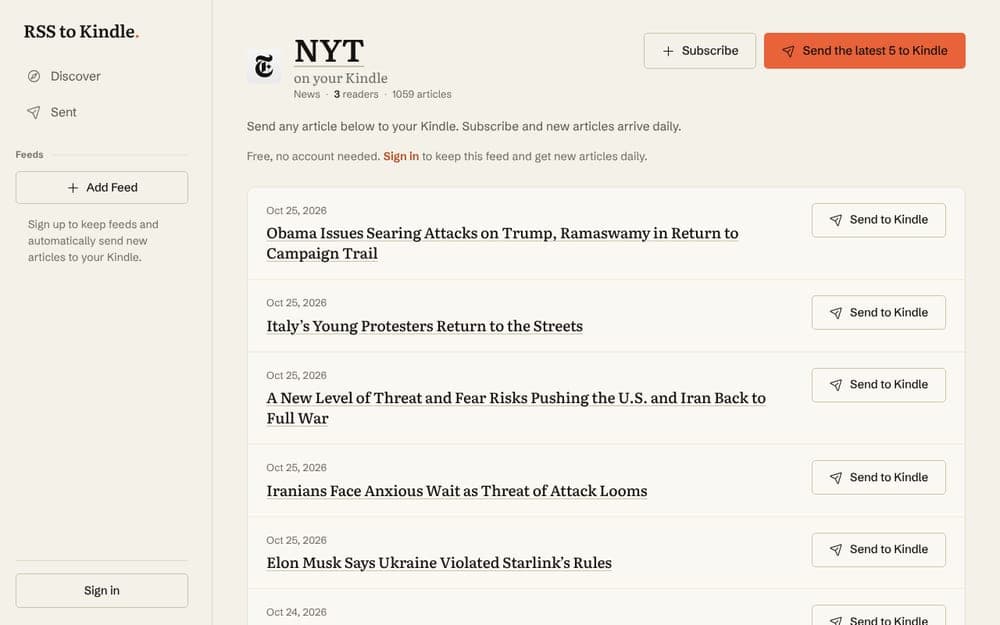
Step 1. Open the New York Times feed page and press Subscribe. You’ll create an account here. If you’d rather try it first, Send the latest works without one.
Step 2. Enter your Kindle’s email address, the one ending in @kindle.com. If you don’t know it, here’s where to find it.
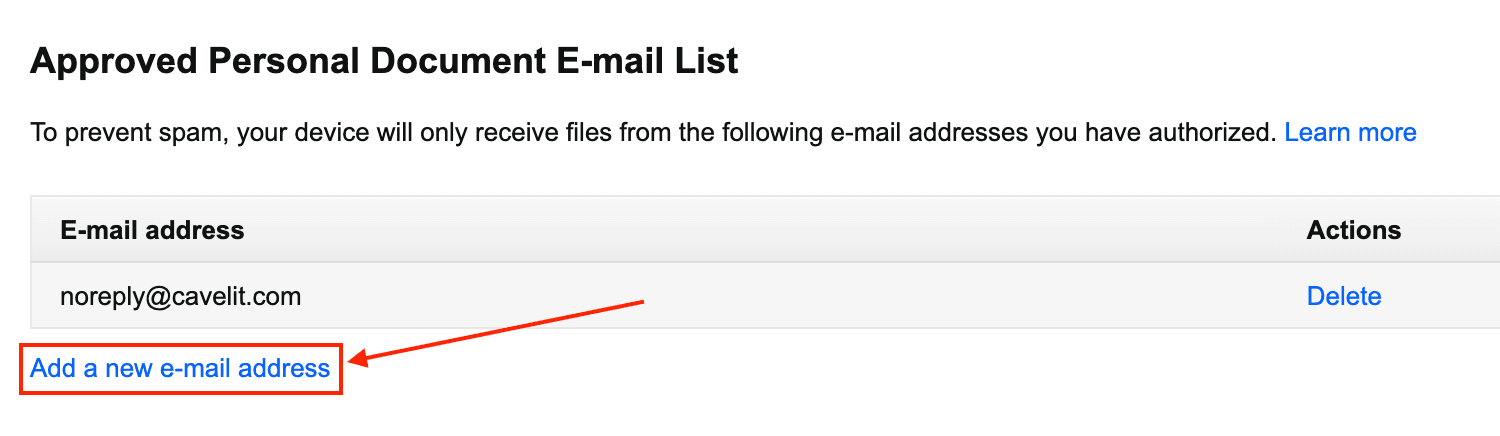
Step 3. In Amazon’s Personal Document Settings, add our sending address to your Approved Personal Document E-mail List. Amazon drops anything from an address that isn’t on it.
2. Send full articles with the Send to Kindle browser extension
If you pay for the Times, this gets you the whole article. You’re sending the page as you see it while logged in, so the paywall isn’t in the way. Some Times pages aren’t paywalled at all, like many Wirecutter reviews, and those send in full without a subscription. The catch: nothing arrives on its own. You open each article on your computer and send it yourself.
- What you get: one full article at a time, whenever you send it.
- What you need: a Times subscription for paywalled articles, a computer, and Chrome, Firefox, or another browser that installs Chrome extensions (Edge, Brave, Arc). It doesn’t work in Safari.
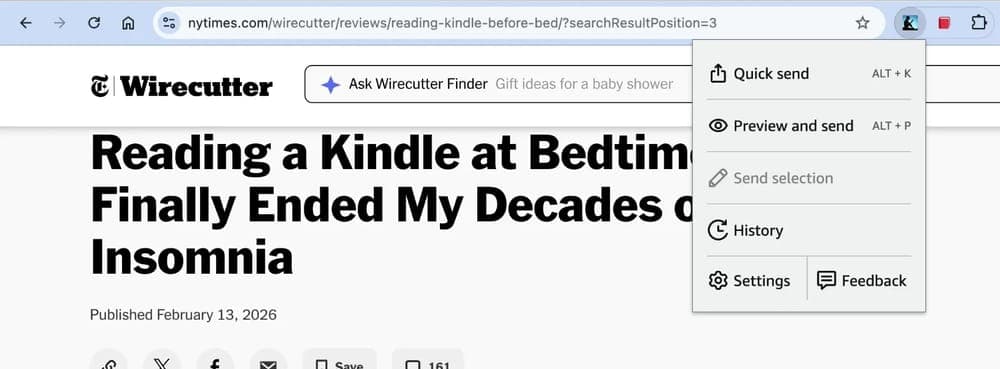
- How: install Amazon’s Send to Kindle extension and sign in with your Amazon account. Open the article on nytimes.com, click the extension’s icon, then Quick send.
3. Share full articles from your iPhone or iPad
The same idea as option 2, from your phone or tablet. It’s how I send a Times story I find on my phone so I can read it properly later. This only works from Safari, not the NYTimes app. That confused me the first time.
- What you get: one full article at a time. Nothing arrives on its own each day.
- What you need: the Kindle app on your iPhone or iPad, and a Times subscription for paywalled articles. Pages that aren’t paywalled, like many Wirecutter reviews, send in full without one.
- How: the four steps below.
Step 1. Open the article in Safari, logged in to the Times if it’s paywalled. Tap the ⋯ button, then Share.
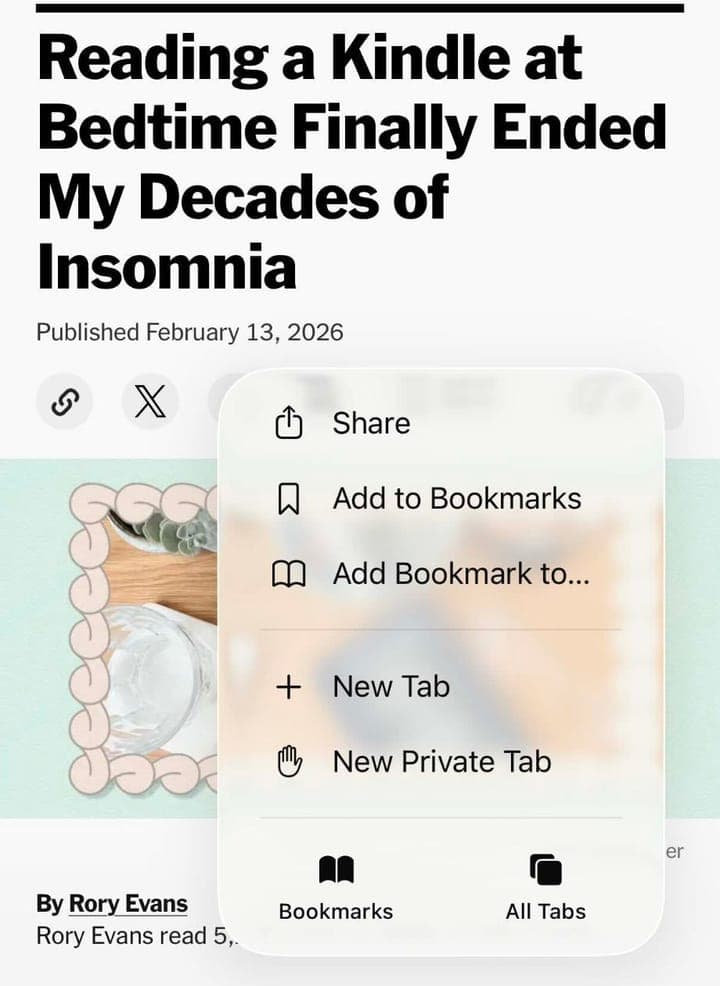
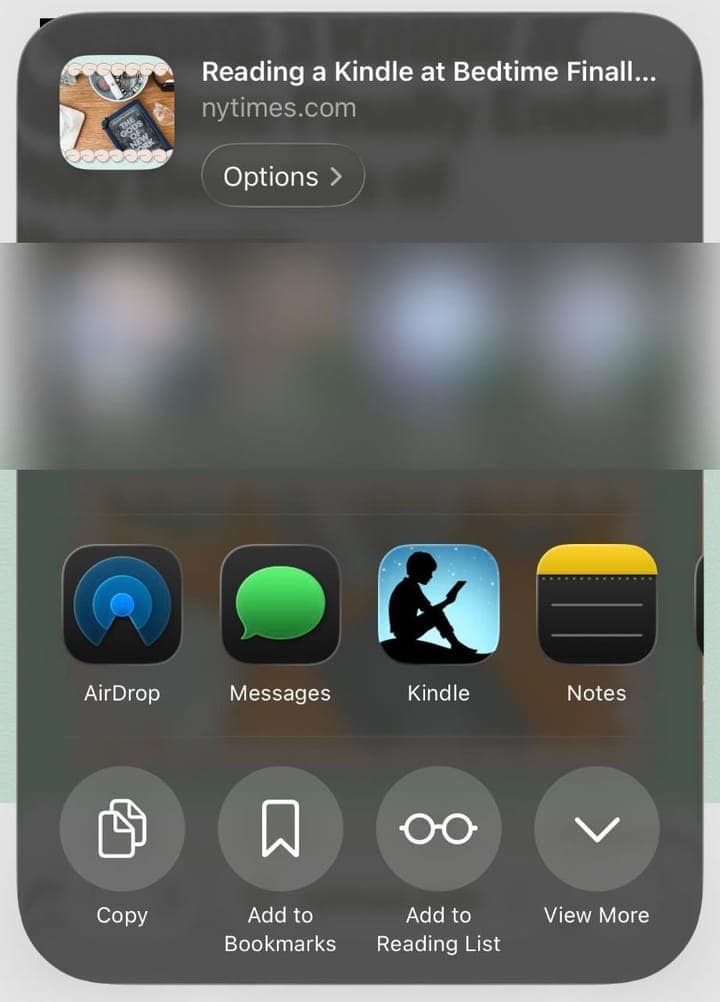
Step 2. Scroll the row of apps to Kindle and tap it, the same as if you were texting the link to someone.
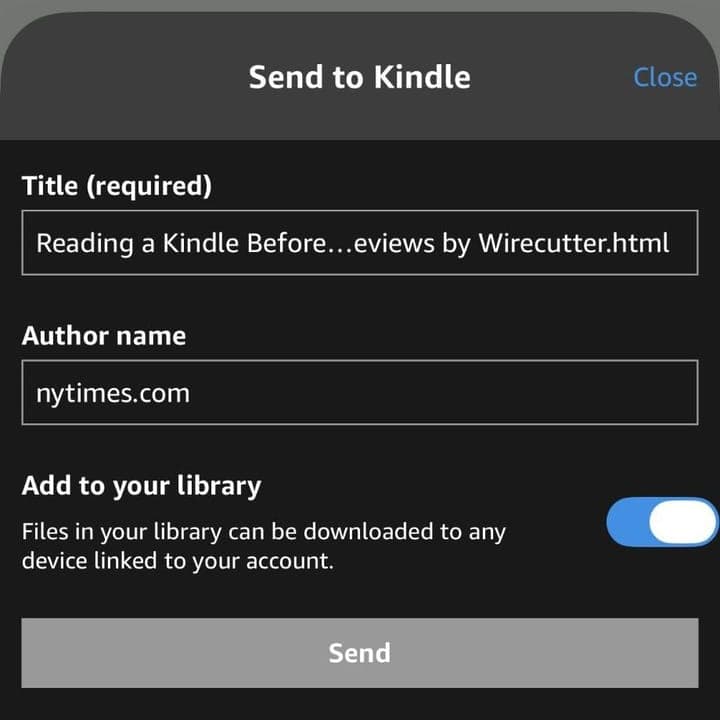
Step 3. Check the title and tap Send.
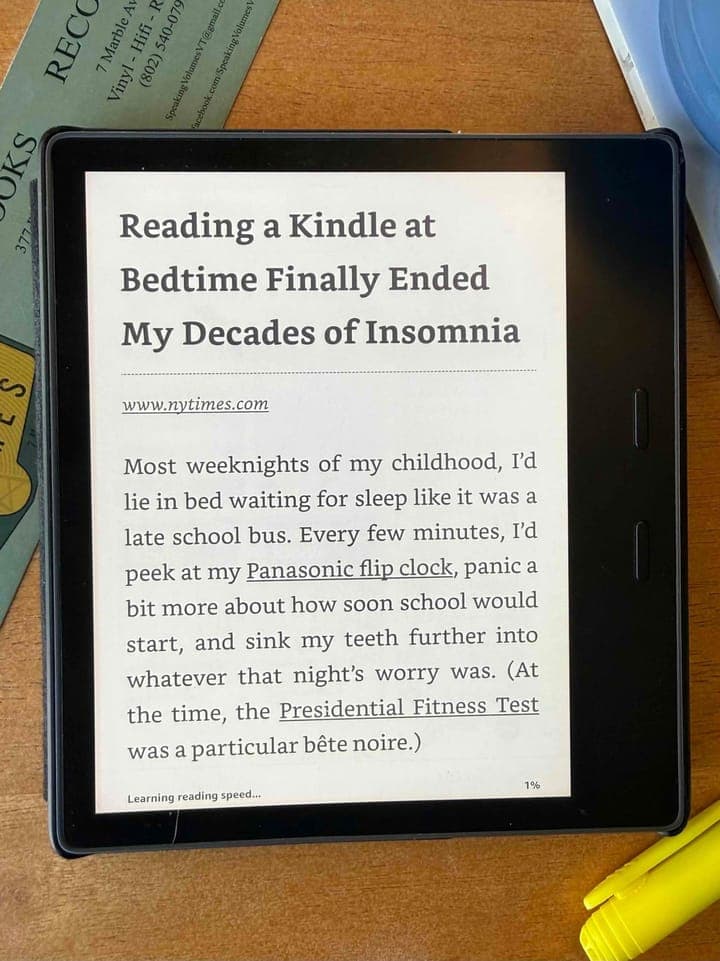
Step 4. It’s on your Kindle a minute later.
What happened to the New York Times Kindle edition?
For years the Times sold a Kindle edition through Amazon: the day’s paper, delivered automatically each morning, for a monthly fee. Amazon stopped selling new subscriptions on 9 March 2023 and shut Kindle Newsstand that September. Linking a Times subscription to a Kindle, which once unlocked nytimes.com for edition subscribers, ended earlier still, in September 2020. Nothing replaced it on Kindle e-readers; option 1 above is the nearest thing that runs on its own.
What I gave up on
Calibre, the free desktop ebook app, has a New York Times news recipe that builds the whole paper as an ebook and can email it to your Kindle. It’s the only automatic way to get full articles, but a computer has to be on when it runs, and the recipe breaks whenever the Times changes its site. I got tired of fixing it. If you want to try it anyway, save the issue as an EPUB and send it with our free tool. For sending single articles there are also Push to Kindle and Instapaper; we compare them with the extension in RSS to Kindle vs Push to Kindle vs Instapaper.
Common questions
Can you read the New York Times on a Kindle?
Yes, just not the old way. The Times' headlines can be delivered to your Kindle every morning by a service like RSS to Kindle. With a Times subscription you can send full articles one at a time, with Amazon's Send to Kindle browser extension or from the share menu on an iPhone or iPad. The Kindle edition itself ended in March 2023.
Can I link my New York Times subscription to my Kindle?
No. Linking a Times subscription to a Kindle ended in September 2020, and the Kindle edition itself stopped on 9 March 2023. A Times subscription gets full articles onto a Kindle only by sending them one at a time, from the Send to Kindle browser extension or the share menu on an iPhone or iPad.
Is there still a New York Times Kindle edition?
No. Amazon stopped selling Kindle edition subscriptions to the Times on 9 March 2023 and shut down Kindle Newsstand in September 2023. Nothing replaced it on Kindle e-readers.
Can I read the New York Times on my Kindle for free?
The headlines and summaries, yes: the Times publishes them in a public RSS feed, which a service like RSS to Kindle can send to your Kindle. Full articles need a New York Times subscription.
Does the NYT app work on a Kindle Paperwhite?
No. The NYTimes app runs on Fire tablets, from the Amazon Appstore, but not on Kindle e-readers such as the Paperwhite, Oasis or Scribe.
Get The New York Times on your Kindle every morning.
Free to try. Pick the NYT, add your Kindle address, and tomorrow's headlines arrive as one clean ebook.
Send the NYT to my Kindle